 Sealio Docs
Checklists
Build reusable checklists of the documents you collect.
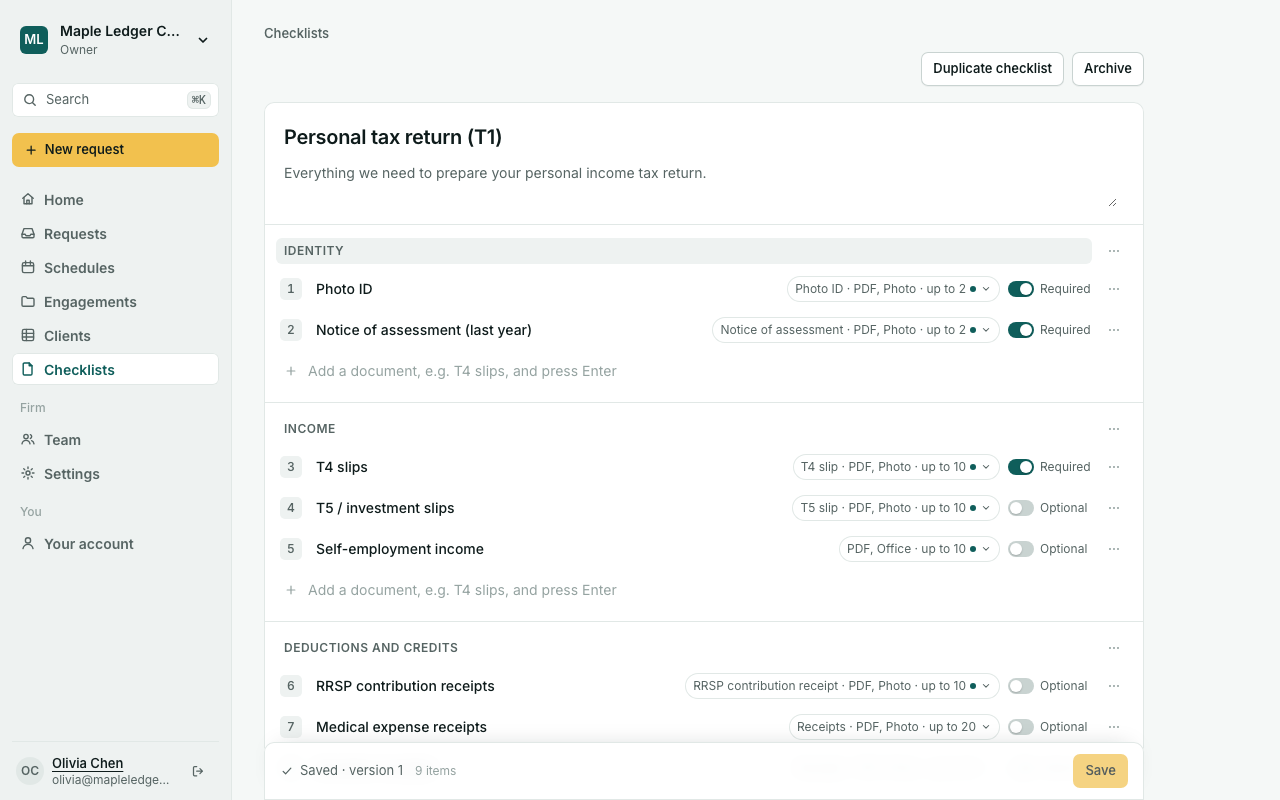
A checklist is a reusable list of the documents you ask a client for, grouped into sections such as Identity or Income. When you send a request, Sealio copies the checklist, so editing it later never changes a checklist a client already has.
Start from the library
Open Checklists → New checklist (you can also do this from New request). Sealio suggests ready-made checklists for your kind of work first:
- Personal tax return (T1) (Canada) or Income tax return (India)
- Monthly bookkeeping
- Study permit and work permit applications (Canada)
- New client onboarding
Choose Use this to make your own copy, then change anything you like. Or choose Start blank.
Build a checklist
- Give the checklist a name, and a description your clients will see.
- Type a document's name in Add a document and press Enter. New items take a PDF or photo, up to 5 files, and are required.
- Use the switch on each item to make it Required or Optional.
- Click the item's file summary (for example PDF, Photo · up to 5) to set:
- Instructions in plain language; clients see them under the item.
- Accepted files: PDF, photos, Word/Excel/CSV, or any file.
- Under More options: the most and fewest files, the largest file size, and Ask for the expiry date for passports, permits and licences.
- Move, duplicate or remove items from the ⋯ menu. Choose Save in the bar at the bottom; each save creates a new version.
Duplicate and archive
Duplicate checklist makes an independent copy. Archive hides a checklist from the list without deleting it; Restore brings it back.
Owners, Admins and Case managers can create and edit checklists. Reviewers and Viewers can see them.
Planned: a French version of each item's name and instructions (today they're shown as you wrote them), sample files, questions on an item, and showing an item only when a previous answer calls for it.