 Sealio Docs
Recurring requests (schedules)
Ask the same clients for the same documents every month, quarter or year.
A schedule sends each of its clients a new request from the same checklist every period: monthly bookkeeping, quarterly GST/HST statements, a yearly tax return.
Set one up (In place)
Open Schedules in the sidebar and click New schedule:
- Title: each request is titled with its period, for example Monthly bookkeeping · 2026-03.
- Checklist and clients. Each client gets their own request, so one late client never holds up the others.
- Repeats: monthly, quarterly or yearly, and the first send date.
- Due after: the number of days clients have.
- Send automatically, or leave each period's requests as drafts for you to check and send.
- Optionally, a case to file the requests under, and a date to stop.
Each send asks for the period that just ended. A monthly send on 5 April asks for March, and a quarterly send in April asks for the first quarter.
Keep track (In place)
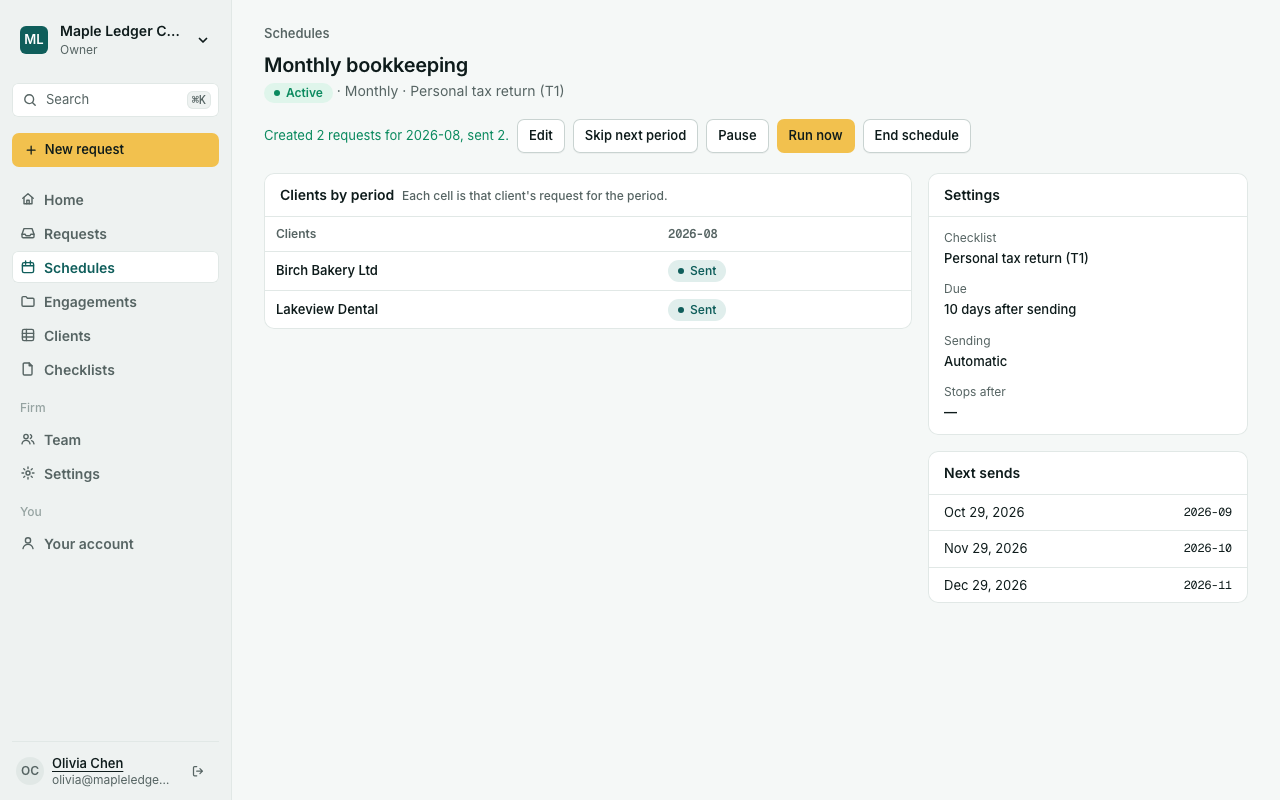
A schedule's page shows its next three sends and a grid with one row per client and one column per period. Each cell shows that request's status and opens it.
You can:
- Run now: send the next period straight away.
- Skip next period: nothing is sent for it.
- Pause and Resume, or End the schedule for good.
- Edit: change the checklist, clients, dates or sending.
Clients you archive are skipped. If the checklist is archived, the schedule pauses until you choose another.
Planned: your firm's fiscal year start for yearly and quarterly periods, custom cadences, reminders before the due date, and items asked only once (such as an engagement letter) when they're already on file.